
I’ve spent the last nine years helping brands build, fix, and grow their online stores. And the single question I get asked most often — usually by a founder who just launched on Shopify or an ops director staring at a six-figure Magento invoice — is: “Are we building this right?”
Most guides about ecommerce development services won’t answer that honestly. They’re written to rank, not to help. This one tries to be different. I’ll tell you what works, what’s overrated, and where the money actually goes — based on real projects, not vendor marketing copy.
What eCommerce development services actually include
When an agency or developer says they offer “eCommerce development,” they might mean anything from setting up a Shopify theme in two weeks to building a fully custom multi-region platform over 12 months. The scope varies wildly. Here’s how to think about it:
Platform setup and configuration — Implementation and configuration of a platform (Shopify, Magento, WooCommerce, BigCommerce) to meet your business needs.
Custom development — Development of functionality or storefronts beyond capabilities offered by the selected platform.
System integrations — Connecting your store to your ERP, CRM, PIM, or warehouse software so data flows without manual work.
Mobile app development — Native apps or progressive web apps (PWAs) for customers who prefer shopping on their phone.
Performance and SEO work — Technical improvements that make your store faster and easier to find on Google.
Platform migration — Moving from an older platform (Magento 1, PrestaShop, OpenCart) to something modern without losing your SEO rankings or data.
Ongoing support and CRO — Regular A/B testing, checkout improvements, and analytics work to improve conversion rates over time.
The best development partners don’t just write code — they ask why you need a feature before they build it, and they’ll tell you when a simpler solution exists.
Why your tech stack affects your revenue
Here’s something I wish more store owners understood early: your technology choices aren’t just IT decisions — they’re business decisions with a direct line to your bottom line.
A slow store loses customers before they even see your products. A broken mobile layout drives away over half your audience. A clunky checkout pushes people out at the exact moment they’ve decided to buy.
According to a Deloitte study, even a 0.1-second improvement in mobile site speed significantly impacts conversions and customer engagement across retail, travel, luxury, and lead generation industries.
The research found retail conversions increased by 8.4%, travel conversions by 10.1%, and luxury brand page views per session grew by 8.6% after mobile speed improvements.
This is why technical investment in your store compounds over time. Every improvement — faster loading, cleaner checkout, smarter search — adds up across millions of sessions.
15 features your store needs in 2026
Not all of these apply to every store, but if you’re missing several of them, you’re almost certainly leaving money on the table. Think of this as a diagnostic checklist.
1. Mobile-first design
More than half of eCommerce traffic now comes from phones. Statista’s 2025 data puts mobile’s share of global web traffic consistently above 60%. If your site isn’t built for small screens first, you’re already losing.
2. Fast loading — actually fast, not just “okay”
Google’s Core Web Vitals are now a real ranking factor. LCP (largest contentful paint) under 2.5 seconds, CLS (cumulative layout shift) under 0.1. These aren’t vanity numbers — sites that hit them consistently outperform those that don’t in both rankings and conversions.
3. Smart site search
Shoppers who use your search bar are your most motivated buyers. Multiple studies show shoppers who use onsite search are significantly more likely to convert, with some studies showing 2–3x higher conversion rates.
The data also reveals that poor search experiences drive users away — 80% of shoppers abandon websites because of bad search functionality, while 31% of product searches fail to return useful results.
Features like autocomplete, typo correction, synonym matching, and personalized results can dramatically improve engagement, conversions, and customer retention for eCommerce brands.
4. A checkout that doesn’t get in the way
The fewer steps between “add to cart” and “order confirmed,” the better. Guest checkout should be the default, not something users hunt for. Save addresses. Offer express options like Apple Pay and Google Pay.
5. Multiple payment methods
Card, PayPal, Buy Now Pay Later (Klarna, Afterpay), UPI if you’re selling in India — payment friction kills conversions. A customer who can’t pay the way they prefer won’t switch payment methods. They’ll just leave.
6. Reviews and social proof
Product pages with reviews consistently convert better. Northwestern University’s Spiegel Research Center found that even five reviews can increase purchase likelihood by up to 270% for lower-priced items. The effect is especially strong for new customers who don’t know your brand yet.
7. Personalization that’s actually relevant
Showing someone a recommendation for something they just bought isn’t personalization — it’s noise. Good personalization uses browse history, category behavior, and real-time signals to surface things the customer actually wants to see.
8. Live inventory and accurate shipping estimates
Customers don’t like surprises. Tell them what’s in stock, when it ships, and when it arrives — before they reach checkout. Baymard Institute research consistently finds that unexpected shipping info is a top-three reason for checkout abandonment.
9. Security done properly
SSL, PCI DSS-compliant payment handling, two-factor authentication for admin accounts, regular vulnerability scanning. Not optional — a breach can cost far more than the security investment, and it destroys customer trust in a way that’s hard to rebuild.
10. Faceted filtering on category pages
If your store sells more than 50 products, customers need to be able to narrow down by size, price, color, material, or whatever attributes matter in your category. Poor filtering = high bounce rates from category pages.
11. Analytics you can actually use
Revenue attribution, funnel drop-off, customer lifetime value — these metrics should be visible in your admin, not require exporting a spreadsheet every time someone asks a question.
12. Multi-currency and localization
If you’re selling internationally, showing prices in local currency (and accepting local payment methods) meaningfully increases conversion. Customers hesitate when they have to calculate exchange rates themselves.
13. A clear returns process
Particularly important for fashion, footwear, and electronics. An easy, transparent return policy removes a significant purchase barrier — especially for first-time customers who aren’t sure about sizing or quality.
14. Email and SMS capture with value exchange
Not a pop-up that covers the page as soon as someone arrives. A well-timed, value-led capture (discount, early access, useful content) after they’ve shown intent converts better and attracts higher-quality subscribers.
15. Accessibility basics
Alt text on images, keyboard navigability, sufficient color contrast. Beyond being the right thing to do, accessibility improvements often help SEO and improve usability for all visitors, not just those with disabilities.
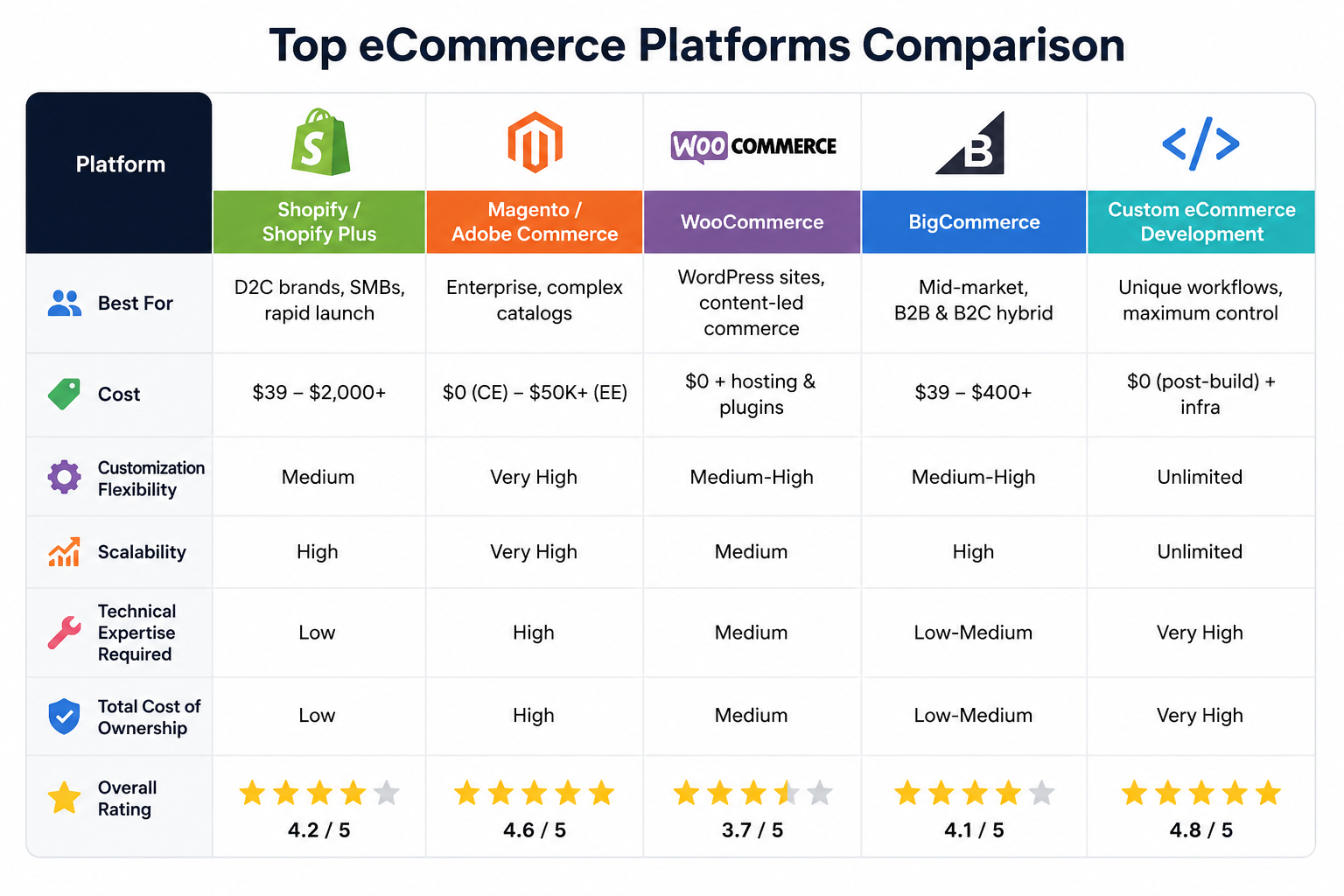
Shopify vs Magento vs WooCommerce vs Custom: an honest comparison
I’ve built stores on all of these. Here’s my unvarnished take — platform choice is less about “which is best” and more about which fits your specific situation.
If you’re launching a new D2C brand and debating between Shopify and a custom build — start with Shopify. You can migrate later when you’ve validated product-market fit and actually know what custom features you need. Building custom before you have data to inform it is expensive guesswork.
Headless commerce — when it makes sense and when it doesn’t
Headless means separating your storefront (what customers see) from your commerce backend (cart, checkout, catalog, payments). Your frontend talks to the backend through APIs. It’s a meaningful architectural shift, not just a buzzword.
The genuine advantages: better performance through edge rendering, complete design freedom, and the ability to run one backend across your web store, mobile app, in-store kiosks, and any other touchpoint.
The honest downsides: it’s significantly more complex to build and maintain. Expect to spend $80K–$300K+ and find developers who actually understand JAMstack and Next.js. A poorly executed headless build will perform worse than a well-tuned Shopify theme — and I’ve seen that happen more than once.
Go headless when performance, brand differentiation, and omnichannel reach are genuinely business-critical. Don’t go headless because it sounds impressive.
If you’re a growing brand with a good Shopify setup and a solid dev team, optimizing your existing theme will get you 80% of the performance gains headless promises — at a fraction of the cost and timeline.
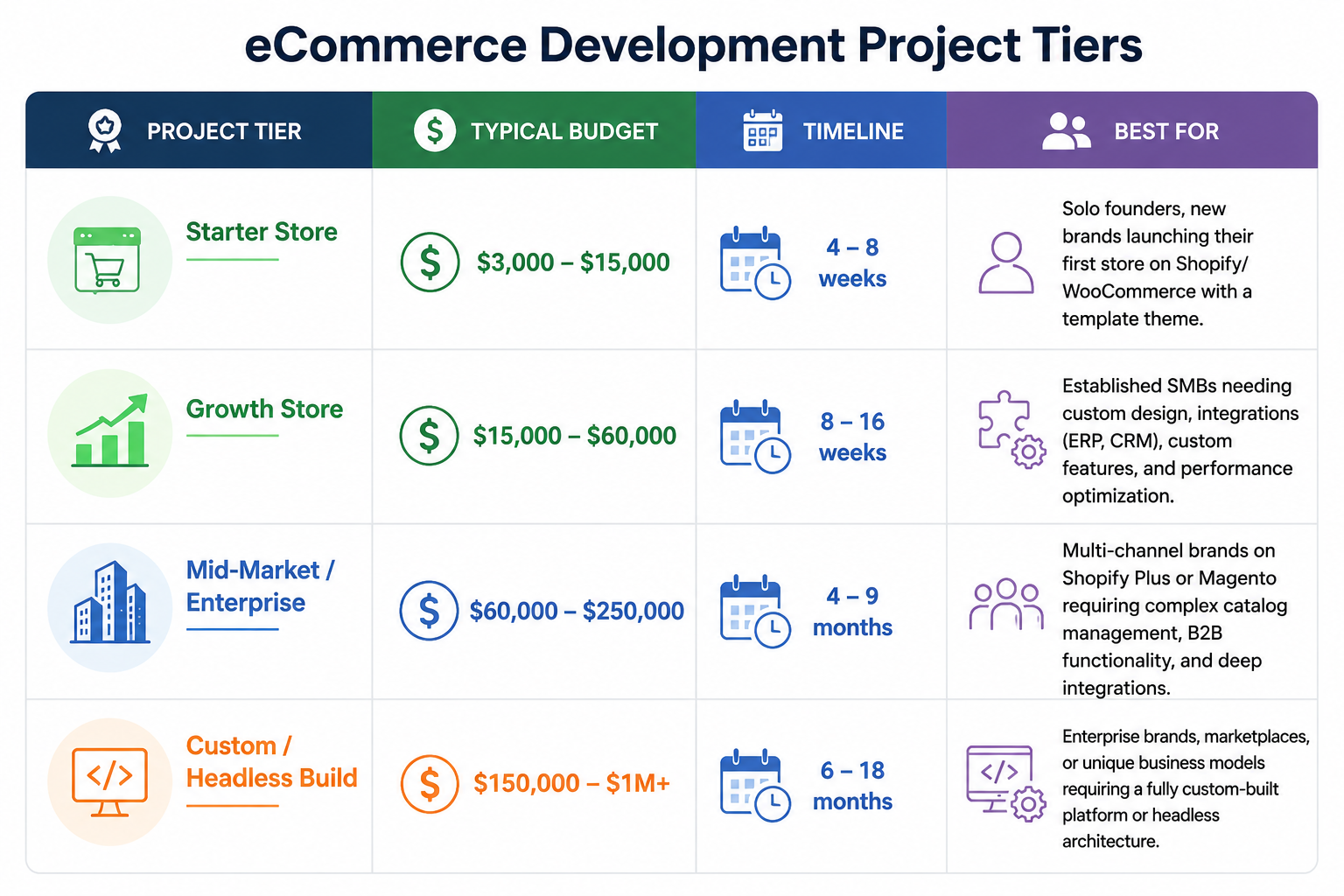
What does it actually cost to build a store?
This is where a lot of agencies give vague answers. Here are realistic ranges based on current market rates:
The costs people forget to budget for
- Platform subscriptions — Shopify Plus starts at around $2,300/month. Adobe Commerce licensing can reach $100K+ annually.
- Third-party apps — A typical Shopify store running 10–15 apps adds $500–$2,000/month in recurring fees.
- Payment processing — Stripe and PayPal charge roughly 2.5–2.9% per transaction. On $1M in annual sales, that’s $25,000+ in fees.
- Ongoing development — Expect $3,000–$15,000/month for continuous feature work, security updates, and CRO.
Hosting (for self-hosted platforms) — Magento on AWS can run $1,000–$10,000/month depending on traffic.
B2B eCommerce: different rules, different tools
B2B buyers are not just B2C buyers buying more units. They have approval workflows, purchase order requirements, negotiated pricing, and net payment terms. Building a B2B store without understanding these workflows creates friction that kills adoption — particularly with procurement teams who have no patience for clunky interfaces.
According to Statista, the global B2B eCommerce market exceeded $20 trillion in 2025, outpacing B2C growth as digital procurement becomes standard across industries.
What a proper B2B store needs
- Customer-specific pricing and catalogs — Different buyers see different prices based on their contract.
- Quote and RFQ workflows — Sales teams respond to custom quote requests directly from the platform.
- Purchase order and net terms support — Buyers submit POs and pay on net-30 or net-60 terms.
- Multi-user company accounts — Buyers, approvers, and finance roles with defined permissions in one account.
- Bulk ordering and quick reorder — CSV upload, saved order templates, one-click reorder.
- ERP integration — Real-time sync with SAP, NetSuite, or Microsoft Dynamics for accurate inventory and order data.
AI tools in eCommerce that are actually worth it
I want to be careful here. There’s a lot of “AI-powered” in eCommerce vendor marketing right now, and most of it is incremental feature improvement with a trendy label. But some applications of AI genuinely move the needle — and a few are becoming table stakes.
Product recommendations
This is the one with the clearest ROI track record. McKinsey estimates that personalization-driven recommendations account for 35% of Amazon’s purchases. Platforms like Algolia, Constructor.io, and Nosto bring this capability to stores of all sizes — without building a recommendation engine from scratch.
AI-assisted search
Natural language queries are increasing. Customers type “blue dress for a wedding under ₹3000” instead of navigating to a category and applying five filters. AI search handles this well. Typo tolerance and synonym matching also meaningfully reduce zero-results pages, which are conversion killers.
Dynamic pricing
Price optimization based on demand signals, inventory levels, and competitor data. Most useful for large catalogs or brands with significant margin variability. Overkill for stores selling a small, fixed range of products at stable prices.
Predictive inventory
ML models that identify demand patterns and flag reorder points before you run out. Particularly valuable for seasonal businesses or brands with long supplier lead times.
AI-generated product content
Generating product descriptions and meta tags at scale is genuinely useful when you’re managing thousands of SKUs. The output isn’t always perfect, but it’s a solid starting point that a human can refine — far more efficient than writing every description from scratch.
AI chatbots that try to replace your customer service team — most current implementations frustrate customers more than they help. Invest in good AI search and personalization first; those have clearer, measurable returns.
Trends reshaping eCommerce in 2026 Composable commerce is going mainstream
The MACH approach (Microservices, API-first, Cloud-native, Headless) has moved past early-adopter territory. Larger brands are now assembling best-of-breed components — Commercetools for commerce, Contentful for CMS, Algolia for search — rather than relying on one monolithic platform. Smaller brands shouldn’t rush to follow: this approach requires significant engineering capability to do well.
Social commerce is closing the loop
TikTok Shop, Instagram Shopping, and WhatsApp Commerce are enabling purchases without leaving the social app. If your audience is heavily Gen Z or millennial, not having your catalog connected to these surfaces means missing customers who discovered you on social but won’t click through to a separate website to buy.
AR for product visualization is reducing returns
WebAR — augmented reality that works in a browser without downloading an app — is now accessible for mid-size brands. For furniture, home décor, and eyewear, the ability to visualize a product in context has been shown to reduce return rates by 25–40% in several published case studies. The technology is no longer just for IKEA.
Zero-party data is replacing third-party cookies
With third-party cookies effectively gone, brands are building quiz-based onboarding, preference centers, and loyalty programs to collect data customers willingly share. This zero-party data approach performs better for personalization — customers get relevance, brands get consent — and it’s the direction the industry is moving regardless of what you prefer.
Checkout optimization: where conversions are won or lost
The Baymard Institute puts the average checkout abandonment rate at just over 70%. That’s seven in ten people who added something to their cart and didn’t buy. Many of those abandonments are preventable with better UX decisions which is why modern ecommerce development company increasingly focus on checkout performance, mobile usability, and conversion optimization rather than just design.
Offer guest checkout by default
Forcing account creation before purchase is one of the most reliably documented conversion killers. Show guest checkout first. Offer account creation on the order confirmation page, when the customer already feels good about their purchase.
Show the full cost early
Shipping cost surprises at the final checkout step are the single most common reason people abandon. Display estimated shipping from the product page or cart — not just at the payment step. If you offer free shipping above a threshold, make that threshold visible throughout the shopping journey.
Cut form fields
The average checkout form asks for more information than it needs. Auto-populate city and state from postcode. Use a single “name” field where possible. Don’t ask for a phone number if you’re not going to use it. Every field removed reduces cognitive friction.
Add express payment options
Apple Pay and Google Pay allow returning customers to check out in one tap. They consistently lift mobile conversion by double digits. If you’re not offering them, you’re creating unnecessary friction for your most engaged shoppers.
Build an abandoned cart recovery flow
A three-email sequence (immediate, 24-hour, 72-hour) recovering abandoned carts typically brings back 5–15% of those sessions. SMS reminders add another layer for customers who opted in. The return on this is almost always positive relative to the setup cost.
eCommerce SEO checklist
eCommerce sites have specific SEO challenges: duplicate content from filters and variants, thin product pages, and pagination issues. These are things a standard SEO guide doesn’t cover well. Here’s what to actually prioritize:
Technical fundamentals
- Canonical tags on all paginated pages, filtered URLs, and product variant URLs
- Structured data markup (Product, Offer, AggregateRating schemas) to qualify for rich snippets in Google Search
- Core Web Vitals: LCP under 2.5s, CLS below 0.1, INP under 200ms on all key landing pages
- XML sitemap including all indexable product and category URLs, submitted to Google Search Console
- Robots.txt excluding faceted navigation parameters, search result pages, and cart/checkout URLs
- Hreflang tags for multi-language or multi-region stores to prevent international cannibalization
On-page SEO for product and category pages
- Unique, keyword-informed title tags and H1s for every category page — not just a copy of the category name
- At least 200–300 words of original descriptive content on category pages addressing what the customer is looking for
- Descriptive ALT text on every product image (what the product is, not “image 1”)
- Breadcrumb navigation with proper Schema markup
- Review content on product pages — adds unique, crawlable text that improves long-tail rankings
- Internal links from category pages to top-performing products and from blog content to relevant category pages
Conclusion
Building an online store in 2026 is no longer just about choosing a platform and uploading products. The brands that win are the ones that treat ecommerce as an ongoing business system — one that combines performance, user experience, data, automation, and continuous optimization.
Whether you’re launching your first Shopify store, migrating from an outdated platform, exploring headless commerce, or scaling a complex B2B operation, the technology decisions you make today will influence your growth for years to come. Faster load times, seamless checkout experiences, intelligent search, mobile-first design, and strategic integrations are no longer optional features — they are fundamental drivers of revenue and customer satisfaction.
The good news is that you don’t need every trend or every advanced feature from day one. What matters is building the right foundation, prioritizing the features that align with your business goals, and investing in improvements that deliver measurable returns over time.
The most effective ecommerce development services focus on solving real business problems, not simply adding more functionality. By choosing the right platform, creating frictionless customer experiences, and continuously refining your store based on data, you can build an ecommerce business that is not only ready for 2026 but positioned for long-term growth in an increasingly competitive digital marketplace.
FAQs
Which eCommerce platform is best for my business?
Shopify is best for beginners and fast-growing D2C brands, WooCommerce suits WordPress-based businesses, and Magento fits large enterprises with complex needs. The “best” platform depends entirely on your budget, technical resources, and business model. There is no universal winner — match the platform to your specific goals.
How long does it take to build an eCommerce website?
A simple Shopify store can go live in 3–6 weeks, while a custom-designed store with integrations typically takes 8–16 weeks. Enterprise or headless builds can take 6–18 months depending on complexity. Having your content, branding, and product data ready before development starts can cut timelines significantly.
Is my payment and personal information safe on an eCommerce website?
Professionally built stores protect customer data using SSL encryption, PCI DSS-compliant payment processors like Stripe or PayPal, and tokenization so raw card data is never stored. Always look for “https://” and a padlock icon in the browser before entering payment details. Reputable stores also display recognized security badges at checkout to build shopper trust.
How do I get more traffic and sales on my eCommerce website?
combination is SEO for long-term organic growth, Google Shopping Ads for high-intent buyers, and email marketing for retention — which delivers up to $42 ROI per $1 spent. Pair these with social commerce on TikTok and Instagram to drive discovery, and continuously run A/B tests on your checkout and product pages to improve conversion rates. Stacking multiple channels consistently outperforms relying on any single traffic source.
How much does it cost to build an eCommerce website?
$3,000 for a basic Shopify store to $250,000+ for an enterprise-level custom build. Key cost factors include platform choice, design complexity, third-party integrations, and ongoing maintenance. Always budget for hidden costs like app subscriptions, payment processing fees, and monthly hosting.