
Workflow automation for business means replacing manual, time-consuming processes with automated systems that trigger actions, route approvals, and move data between tools — without human intervention.
Here is a question worth sitting with: how many hours did your team spend last week on work that a machine could have done?
Chasing invoice approvals. Manually copying data between systems. Sending the same onboarding email to the fifth new hire this month. Re-entering leads from a web form into a spreadsheet — by hand.
These tasks are not just tedious. They are expensive. Studies consistently show that knowledge workers spend nearly 25% of their time on repetitive, low-value tasks that contribute nothing to actual business growth.
This is exactly where workflow automation for small businesses becomes critical. AI workflow automation is the fix, But it is also one of the most misunderstood technologies in business right now — oversold by some, dismissed by others, and implemented badly by most.
AI workflow automation is the fix. But it is also one of the most misunderstood technologies in business right now — oversold by some, dismissed by others, and implemented badly by most.
This guide cuts through the noise. You will learn exactly what AI workflow automation is, where it genuinely saves money, where it does not, and how to implement it
What you will learn in this blog:
- The real difference between AI automation, RPA, and traditional automation (and which one your business actually needs)
- High-ROI use cases with real industry examples
- A proven 5-step implementation framework used by SMEs across Australia and India
- The honest mistakes most businesses make in their first 90 days
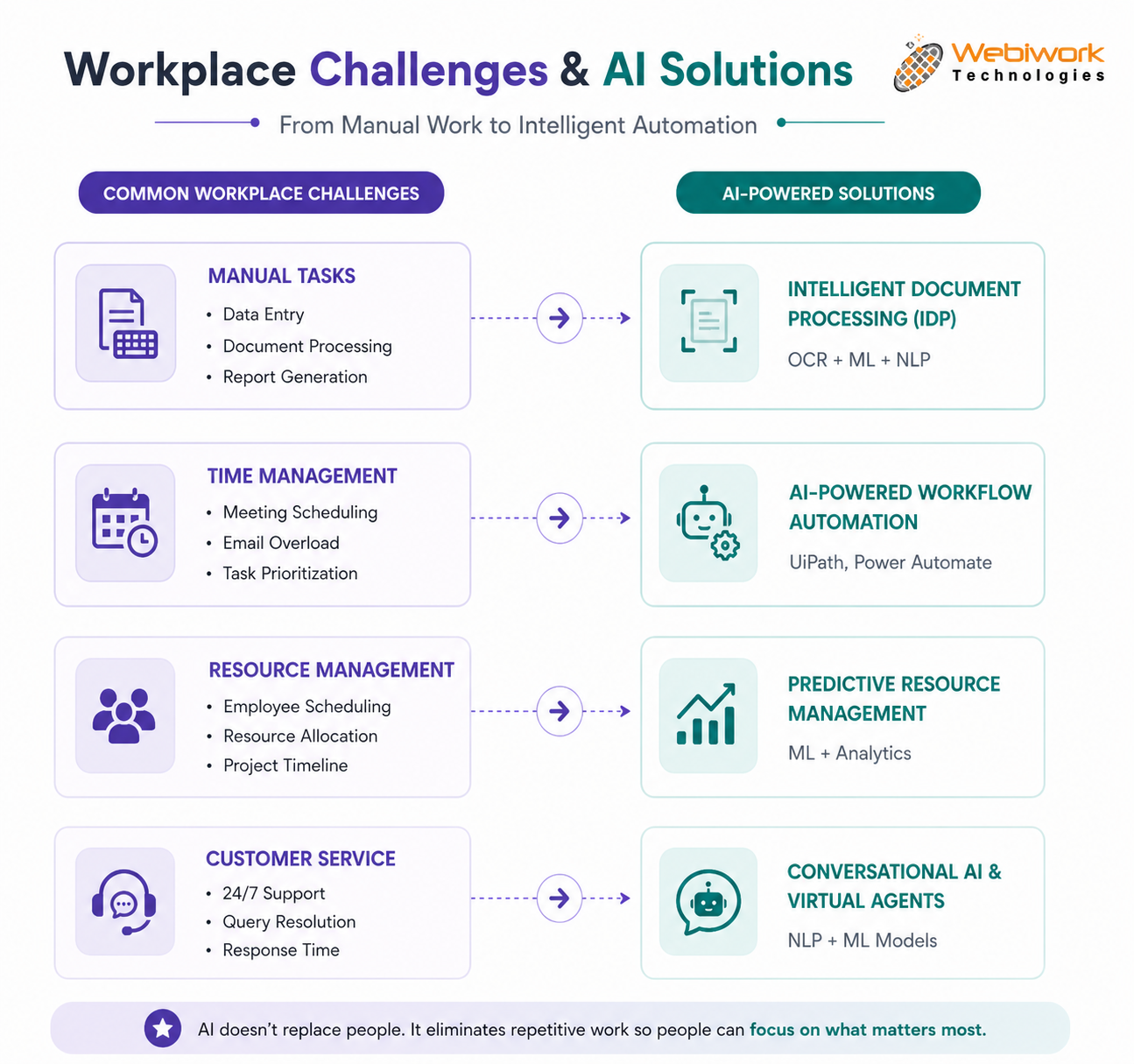
1. What Is AI Workflow Automation — And What It Is Not
A Business workflow automation is any sequence of steps that produces a business outcome — approving a purchase order, onboarding a new employee, responding to a customer complaint. Automation means some or all of those steps happen without a human manually triggering them.
The AI part is what separates modern automation from the older generation of tools. Traditional automation follows rigid rules: IF this happens, THEN do that. It breaks the moment data arrives in an unexpected format or an exception occurs.
AI-powered automation is different. It can read unstructured data — an email written in natural language, a scanned PDF invoice, a voice transcript from a sales call — make a judgement about what it contains, and route it appropriately. It learns from corrections over time and handles exceptions intelligently.
The practical takeaway: you do not always need AI. For simple and predictable processes, a basic Zapier workflow will often perform better than a custom AI solution. The goal is to match the right tool to the right problem
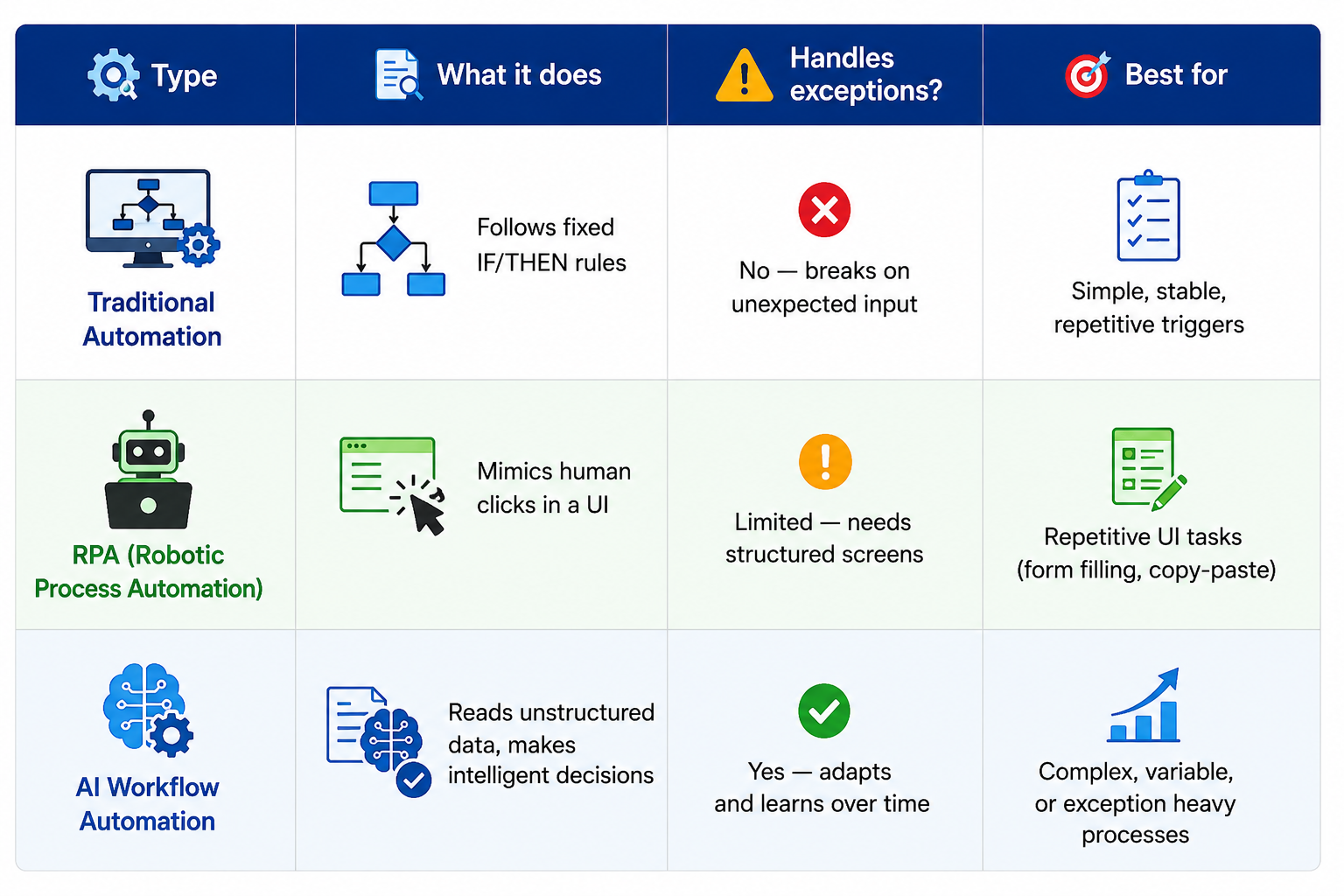
2. Where AI Workflow Automation Actually Delivers ROI
Not every process is worth automating. The best candidates share three traits: they are high-frequency (happen daily or weekly), they are rules-driven enough that logic can be defined, and they currently require human time that could be better spent elsewhere.
Here are seven use cases where businesses are consistently seeing the strongest returns.
Use Case 1: Intelligent Invoice and Accounts Payable Processing
Finance teams in SMEs routinely spend 2–4 hours per day handling invoices — opening emails, extracting vendor details, matching amounts to purchase orders, and routing for approval. Errors here are costly.
AI automation changes this entirely. A workflow can receive an invoice by email, use optical character recognition (OCR) and NLP to extract the relevant fields, match it against your ERP or accounting system, flag anomalies for human review, and send routine invoices straight through for payment — without anyone touching it.
The result: finance teams report cutting invoice processing time by 70–80%, with error rates dropping significantly because humans only see the genuinely complex cases.
Use Case 2: Employee Onboarding and HR Administration
A new hire’s first week is shaped largely by how smoothly onboarding runs. Yet 76% of organizations are still not effectively onboarding their new hires, most businesses still manage this through a combination of emails, spreadsheets, and manual tasks scattered across HR, IT, and the hiring manager.
An automated onboarding workflow triggers the moment a hire is confirmed: IT gets a ticket to provision equipment and software access, the new hire receives a structured welcome sequence, compliance documents are sent for digital signature, and check-in reminders are scheduled automatically.
HR teams using this approach report saving 6–10 hours per new hire while also significantly improving new employee experience scores.
Use Case 3: Customer Support Triage and Escalation
Not all customer queries deserve the same response time. An AI-powered support workflow can read incoming messages, classify them by urgency and topic, route simple queries to a knowledge base or chatbot, escalate complex or high-value cases to a senior agent, and alert the right team member in real time.
This approach reduces first-response time dramatically and ensures your highest-value customers get human attention while routine queries are resolved automatically.
Use Case 4: Automated Reporting and Data Aggregation
If someone on your team spends time every Monday pulling data from three different platforms and building a weekly report in a spreadsheet, that is an immediate automation candidate.
AI workflows can connect to your analytics tools, CRM, financial software, and ad platforms, pull the relevant data on a schedule, apply your standard formatting and calculations, and deliver a finished report to your inbox or Slack channel — without human involvement.
Use Case 5: Sales Lead Routing and CRM Updates
When a lead fills in a web form, an automated workflow can score the lead based on firmographic data, assign it to the right sales rep, create a CRM record, and trigger a personalised email sequence — all within seconds of submission. Sales teams using this approach report a 30–50% reduction in lead response time.
Use Case 6: Contract and Document Management
Automation can trigger contract creation from a CRM deal, route it for internal approval, send it to the client for e-signature, and file the signed version in the correct folder — with no manual handoffs. Legal and operations teams save 3–5 hours per contract cycle.
Use Case 7: IT Helpdesk and Access Provisioning
When an employee joins, moves role, or leaves, an automated workflow can provision or revoke software licences, update Active Directory, and notify relevant team leaders — reducing IT workload by up to 60% for routine access requests.
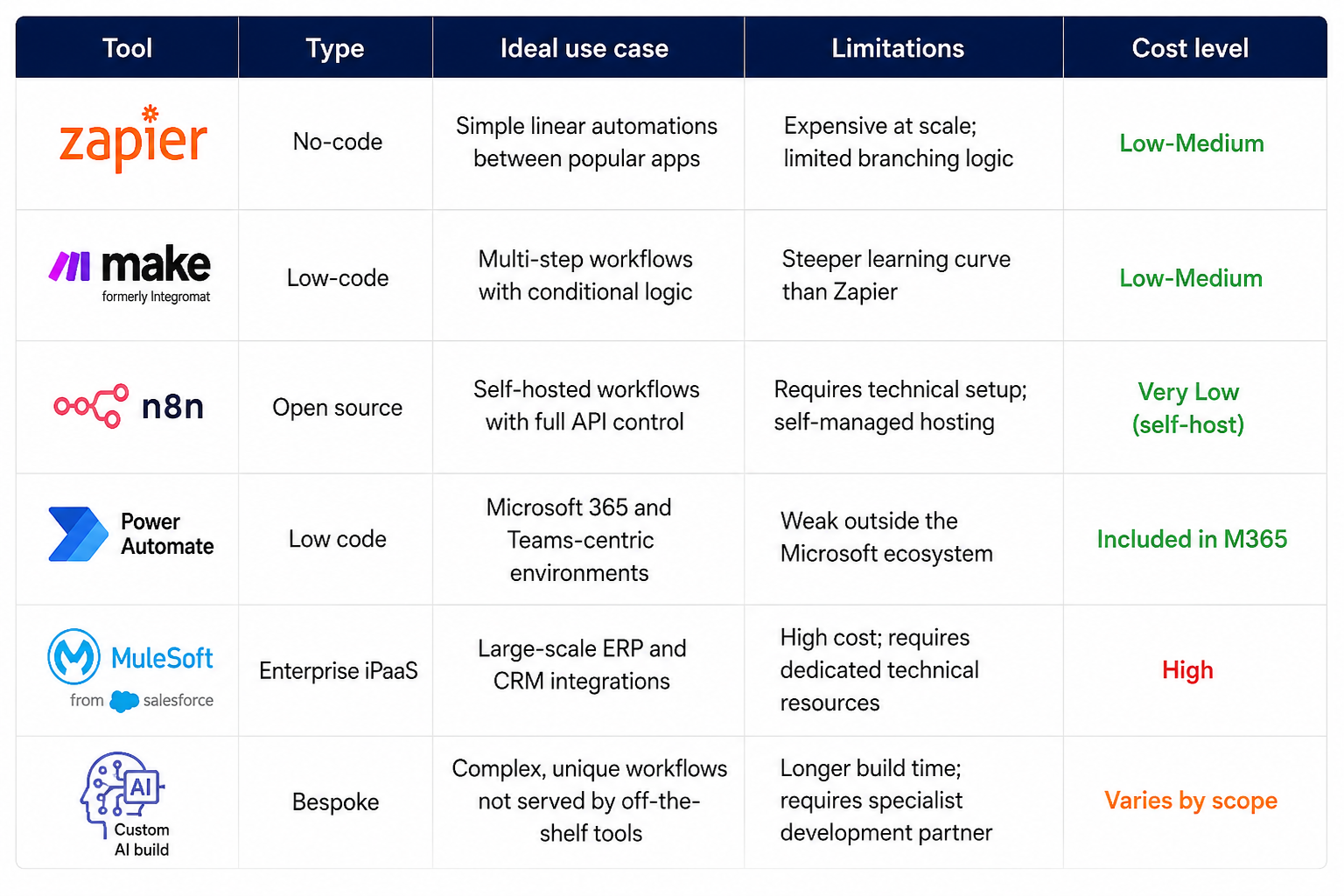
3. Choosing the Right Tool: An Honest Comparison
The automation tool market is crowded and every vendor claims to do everything. Here is a vendor-neutral breakdown of what each category of tool is actually good for — and where it falls short.
How to choose: a practical decision tree
- Starting out, a simple process with popular apps? → Start with Zapier or Make.com
- Need full control, want to self-host, have technical resources? → n8n is the best value
- Deep inside the Microsoft ecosystem? → Power Automate is the obvious choice
- Large enterprise, multiple ERPs and complex data flows? → Look at MuleSoft or Boomi
- Process is unique, none of the above fit well? → Invest in a custom AI build
5. How to Implement AI Workflow Automation: A 5-Step Framework
Most AI automation projects fail — not because the technology does not work, but because implementation is approached backwards. Teams pick a tool, then look for a problem to solve with it. The right approach is the opposite.
Here is the framework we use with clients to go from zero to a live and measurable automation in 4–8 weeks.
Step 1: Audit your highest-friction processes
Before touching any tool, spend one week mapping where your team’s time actually goes. Interview department heads. Look at your project management system for recurring tasks. Ask your team: what do you do every day that you wish you did not have to?
Score each process by two criteria: how often it occurs (frequency) and how long it takes (time cost). The processes in the top-right quadrant of that grid — high frequency, high time cost — are your starting point.
Resist the temptation to automate something just because it sounds impressive. A customer-facing AI chatbot is exciting but far more complex to implement well than an internal invoice routing workflow that could save your finance team 10 hours a week immediately.
Step 2: Document the current workflow in full detail
Map every step of the process end to end. Include every tool involved, every person who touches it, every decision point, and every place where data moves between systems. Do not skip the exceptions — the 20% of cases that are not standard are often what make or break an automation.
This documentation serves two purposes: it reveals inefficiencies in the current process that should be fixed before automating, and it gives a developer or automation platform enough detail to build the workflow correctly the first time.
Step 3: Define your success metric before you build
Decide how you will measure success before a single workflow is built. A vague goal like “make this faster” cannot be evaluated. A specific goal like “reduce average invoice processing time from 4 hours to 45 minutes” can.
Set a baseline measurement now. You will need it in 90 days when someone asks whether the automation was worth the investment.
Step 4: Build in phases — do not automate everything at once
Start with a pilot covering the most common 80% of cases. Build it, test it with real data including edge cases, run it alongside the manual process for two weeks to validate accuracy, then switch over.
Once the first workflow is stable and delivering the expected results, expand to the next use case. This phased approach reduces risk dramatically and builds internal confidence in the technology.
Step 5: Transfer ownership and track KPIs monthly
An automation that no one owns will break and stay broken. Assign a named owner for every workflow — someone who understands what it does and knows how to flag issues when something unexpected happens.
Review your KPIs monthly for the first six months: time saved, error rate reduction, cost impact, user feedback. Use the data to iterate and improve. The best automation builds compound over time as the team learns what works and what needs adjustment.
6. The Most Common Mistakes Businesses Make (And How to Avoid Them)
After working with many businesses on automation, we have seen common patterns that often spoil good plans.
Mistake 1: Automating a broken process
If a workflow is inefficient manually, automating it makes it inefficient at scale. Fix the process logic first, then automate it. A bad workflow running at machine speed creates problems faster than humans can solve them.
Mistake 2: Underestimating data quality requirements
AI automation is only as good as the data it works with. If your CRM is full of duplicates, your invoices arrive in 12 different formats, or your product codes are inconsistent, you will spend more time cleaning up automation errors than you saved. Data cleanup is not optional — it is a prerequisite.
Mistake 3: No change management plan
The real difficulty in automation isn’t the tech, it’s the people. If your team does not understand why automation is being introduced, they will work around it, blame it for errors it did not cause, and ultimately ensure it fails. Involve the people closest to the process in designing the automation — they know the edge cases better than anyone.
Mistake 4: Over-automating too quickly
Trying to automate ten processes simultaneously almost always results in none of them working well. Pick one. Make it excellent. Use that success to build confidence and a template for the next project.
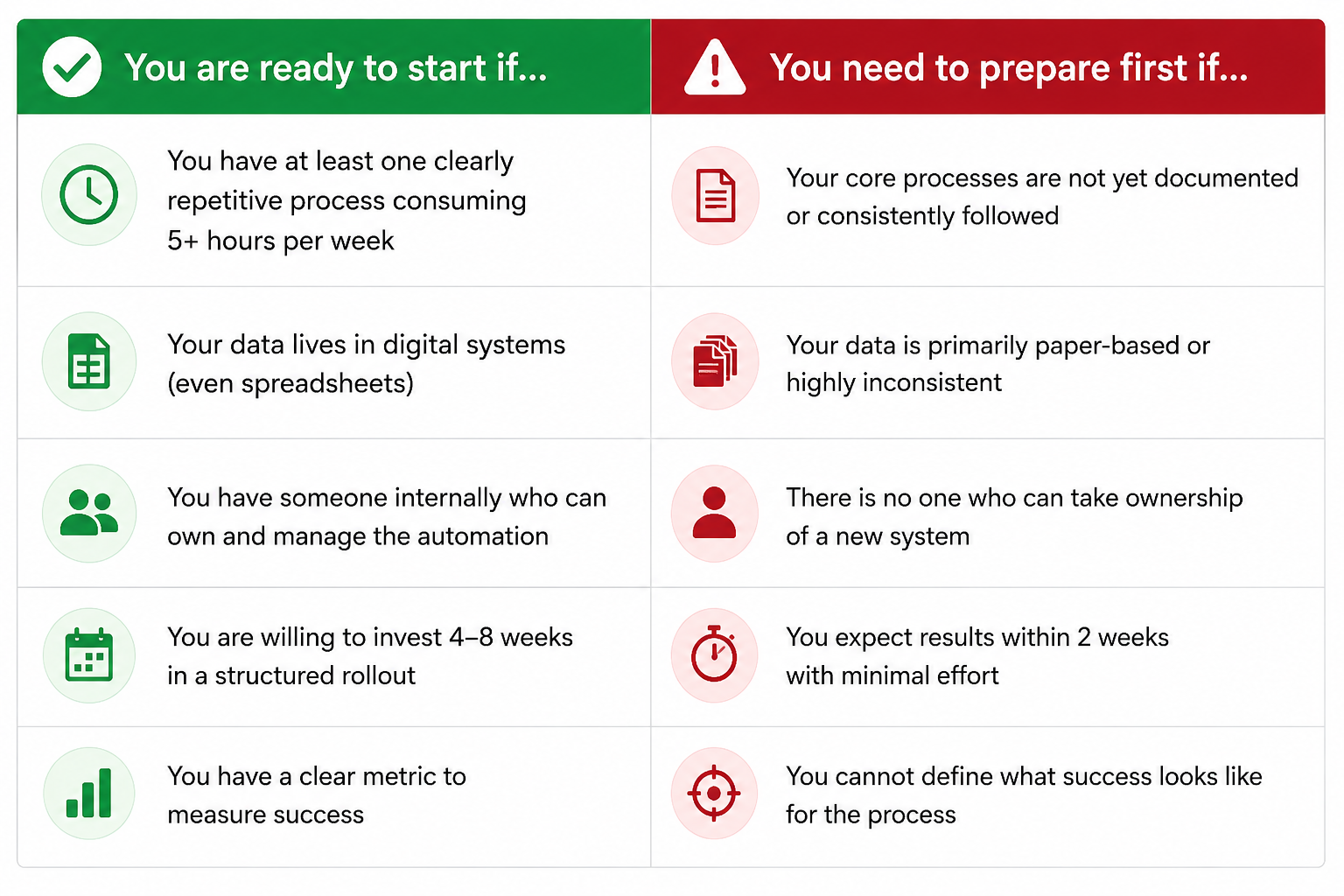
7. Is Your Business Ready for AI Workflow Automation?
Not every business is at the same stage of readiness. Here is an honest self-assessment checklist
Final Thoughts
AI workflow automation for business is not a technology that will replace your team. It is a technology that gives your team back the hours they are currently losing to work that should not require a human at all.
The businesses seeing the strongest results are not necessarily the ones with the biggest budgets or the most sophisticated tools. They are the ones who started with a clear problem, defined success before they built anything, and committed to a phased, disciplined rollout.
Start with one process. Measure it honestly. Learn from it. Then scale.
That is how sustainable automation gets built — not with a flashy tool, but with a clear head and a willingness to do the groundwork properly.
Ready to automate your first business workflow?
We work with businesses globally to design, build, and manage workflow automation for small and medium business that delivers measurable ROI
Book a free 30-minute workflow audit with our team
FAQs
How much does workflow automation cost for a small business?
No-code tools like Zapier or Make.com start at $20–$50/month. Open-source options like n8n are free to self-host. Custom AI builds vary by project scope. Most small businesses see positive ROI within 3–6 months.
How is AI workflow automation different from standard automation?
Standard automation follows fixed rules and breaks when input data changes format or an exception occurs. AI automation interprets unstructured data, adapts to variations, and improves over time through pattern learning. The practical difference is reliability: AI-powered workflows handle real-world messiness far better than rule-based systems.
Free workflow automation for small businesses
Top free workflow automation tools include Activepieces, n8n, and Gumloop for building automated, no-code, or AI-powered tasks.
Will workflow automation replace employees?
No. Workflow automation handles repetitive, low-value tasks so employees can focus on strategic, creative, and relationship-driven work. It augments human effort rather than replacing it.
Which business processes are best suited for automation?
The best candidates are high-frequency, rules-driven processes that consume significant human time — such as invoice approvals, lead follow-ups, HR onboarding, customer support triage, and weekly reporting.